 Directory
Look-dev sync: aligning VFX and maquilleur workflows before principal
Misaligned visual development can add days of costly reshoots. This guide shows producers, VFX supervisors and special-effects maquilleurs how to build a shared “look-dev sync” pipeline that locks the aesthetic before the first camera roll.
Why look-dev sync matters to your bottom line
Look-dev sync means running visual development meetings where VFX artists and special-effects makeup teams collaborate in real time. When that dialogue starts early, you:
- Cut iterative loops by up to 40 %, saving precious shoot days.
- Avoid colour-grade clashes between prosthetics and digital extensions.
- Reduce on-set decision fatigue for directors and cinematographers.
Studios that postponed these sessions on mid-budget features have reported six-figure budget creep, according to the Producers Guild of America.
Typical pain points when departments stay siloed
- Inconsistent spec language. A maquilleur may label a silicone blend “vampire pallor #3” while a compositor sees only RGB values.
- Texture scale mismatch. Prosthetic skin pores shot in 6K rarely match CG displacement if each team picks references alone.
- Lighting assumptions. Practical makeup is tested under tungsten; VFX plans for HDRI daylight. The first dailies reveal the mismatch.
Seven-step workflow to lock the look before principal photography
| Step | Primary Owner | Key Deliverable | Timing |
|---|---|---|---|
| 1 Kickoff brief | Producer | Creative intent deck + schedule | -16 wks |
| 2 Shared mood-board | Makeup HOD & VFX supe | Approved colour palette | -15 wks |
| 3 Material tests | Maquilleur | Silicone swatches, UV photos | -13 wks |
| 4 Digital shader pass | Look-dev artist | Turntable renders | -11 wks |
| 5 Joint dailies | Both depts. | Annotated stills | -10 wks |
| 6 Camera test | DOP | Graded footage with prosthetics & CG overlays | -8 wks |
| 7 Lock approval | Director | Signed off reference bible | -6 wks |
Step-by-step details
1. Kickoff brief: speak the same language
Hold a two-hour meeting where the VFX supervisor and maquilleur outline constraints. Use a shared glossary so a term like “sub-surface scatter” means the same plaster thickness and digital shader depth.
2. Co-create a cloud-based mood-board
Platforms such as Miro or Frame.io let both teams pin references side by side. Slip in a link to the best portfolio-tag practices for SFX maquilleurs so everyone reviews consistent images.
3. Material and pigment tests
The maquilleur casts a mini-prosthetic and photographs it under daylight, tungsten and LED. Results are dropped into the cloud board for VFX to sample exact albedo values.
4. Digital shader pass
Look-dev artists apply scanned displacement, tint values and micro-specular maps. They render a 360° turntable that the makeup team checks for pore density and wrinkle flow.
5. Joint daily reviews
Set a 15-minute recurring slot. Keep feedback action-oriented: “Increase blue channel in shadow by 5 %” instead of “Looks cold.” This micro-iteration prevents week-long approval limbo.
6. Full camera test
Shoot the actor wearing the final prosthetic under production lighting, then overlay the CG extension live via Unreal Engine. Problems become visible while fixes are still cheap.
7. Sign-off and lock
Compile all texture maps, pigment recipes and LUTs in a PDF “reference bible.” Everyone signs. From this point on, changes require producer approval to protect schedule integrity.
Collaboration hacks seasoned crews swear by
- Create a neutral-light booth on location so both teams can verify hues quickly.
- Use shared naming conventions. File 001_Makeup_Silicone_V02.exr beats “newest_final2.psd”.
- Pre-bake lighting rigs. Provide your VFX house with calibrated HDRI spheres captured during makeup tests.
- Budget transparently. Run an early prosthetic budget analysis so VFX knows financial limits.
Risk mitigation: insurance and hygiene checkpoints
High-risk sets—rain machines, pyrotechnics—demand extra coverage. Align policies that protect maquilleurs on hazardous locations. A single allergic reaction can halt principal photography for days.
Pipeline tools worth the licence fee
- ACES colour pipeline. Guarantees that flesh tones painted at 5000 K align with final grade.
- Substance 3D Sampler. Converts silicone swatches into tileable maps in minutes.
- ShotGrid. Tracks versions and approval status across departments without email chaos.
Case study: creature feature under €10 M
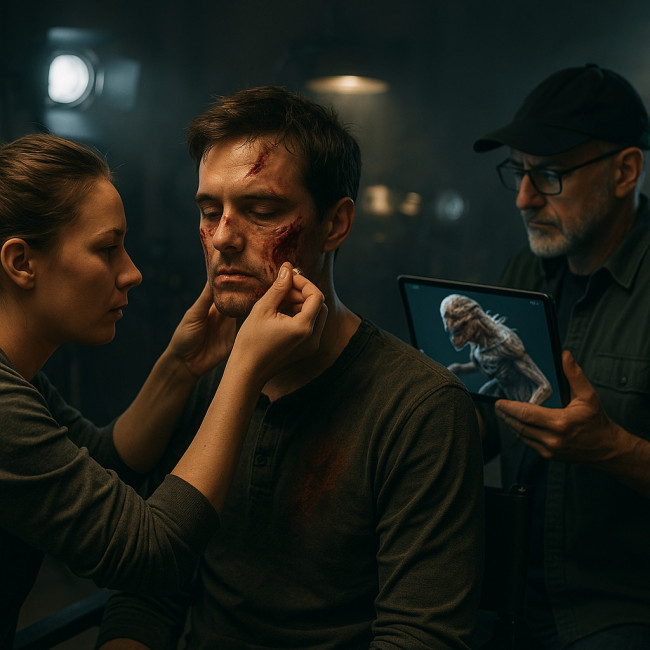
An indie horror shot in Prague shaved three shoot days by running look-dev sync sessions weekly. Practical wounds blended seamlessly with digital vein animations, which boosted sales at Marché du Film according to the producer. During production, the teams introduced a colour-calibrated neutral-light tent on location, feeding real-time footage through an ACES pipeline and annotating shader tweaks in ShotGrid. By the time the climactic cathedral set piece was filmed, the layered silicone gashes and volumetric blood sim shared identical specular highlights, eliminating the need for expensive plate re-shoots in post.
To replicate that success, inspect portfolios on the special-effects makeup artist directory and shortlist artists who already list ACES-compliant workflows.
Quiz: test your look-dev sync IQ
FAQ
- How early should look-dev sync start?
- Begin at least 16 weeks before principal photography. That allows enough rounds of prosthetic casting and digital shader refinement.
- Who leads the sessions?
- The producer coordinates logistics, but the VFX supervisor and makeup head of department share creative leadership.
- Do I need expensive software to implement this?
- No. Free tools like DaVinci Resolve and Blender can handle basic colour management and shader previews, though paid licences accelerate workflow.
- What if last-minute script changes alter the creature design?
- Re-open the reference bible, log the change, and run a mini sync meeting. Documenting deviations keeps everyone accountable.
Next step: lock your own pipeline today
Ready to stop costly reshoots? Download our free reference-bible template and start your first look-dev sync call this week. Your future budget—and your crew's sanity—will thank you.
Discover how on-set retouch expectations fit into this pipeline and keep creative intent rock-solid from concept to final grade.